



At Modular, we’ve consistently recommended moving away from image-based emails in favor of HTML-first designs. A recent Gmail update underscores why this approach is more important than ever.
Promotions tab annotations: an overview
Gmail’s Promotions tab supports dynamic modules called annotations, which allow brands to showcase product images, deals, and key details directly in the inbox preview — without the recipient even opening the email.
These annotations are typically coded with structured markup (AMP for Email). However, Gmail doesn’t always rely solely on markup anymore.
Annotations also don’t appear for every recipient. Gmail displays them selectively based on factors like sender reputation, content quality, and inbox density. In our experience, annotations surface for a small portion of recipients — often around one-third — though the exact percentage varies.
Because of this, annotations should be seen as a visibility boost, not a guaranteed placement, and are most effective when paired with HTML-based email builds and deliberate annotation coding.
Gmail’s “Automatic Extraction”
Google recently introduced a process known as Automatic Extraction, where Gmail uses AI to scan promotional emails and extract elements that resemble product content — such as images, prices, or offers. These extracted elements may then be surfaced as annotations, even when a brand hasn’t coded them.
This means Gmail is effectively auto-generating annotations from your email content.
In practice, Gmail’s AI appears to favor simple, product-like images. More complex slices — such as those that combine multiple products, embedded text, or CTA buttons — often don’t register as a single product image and may be ignored. As a result, Gmail may instead surface a less relevant image, such as a small footer icon, instead of the intended hero product.
Real example: In the screenshot below, Gmail ignored promotional slices containing multiple offers and instead surfaced two simple footer icons as annotations.
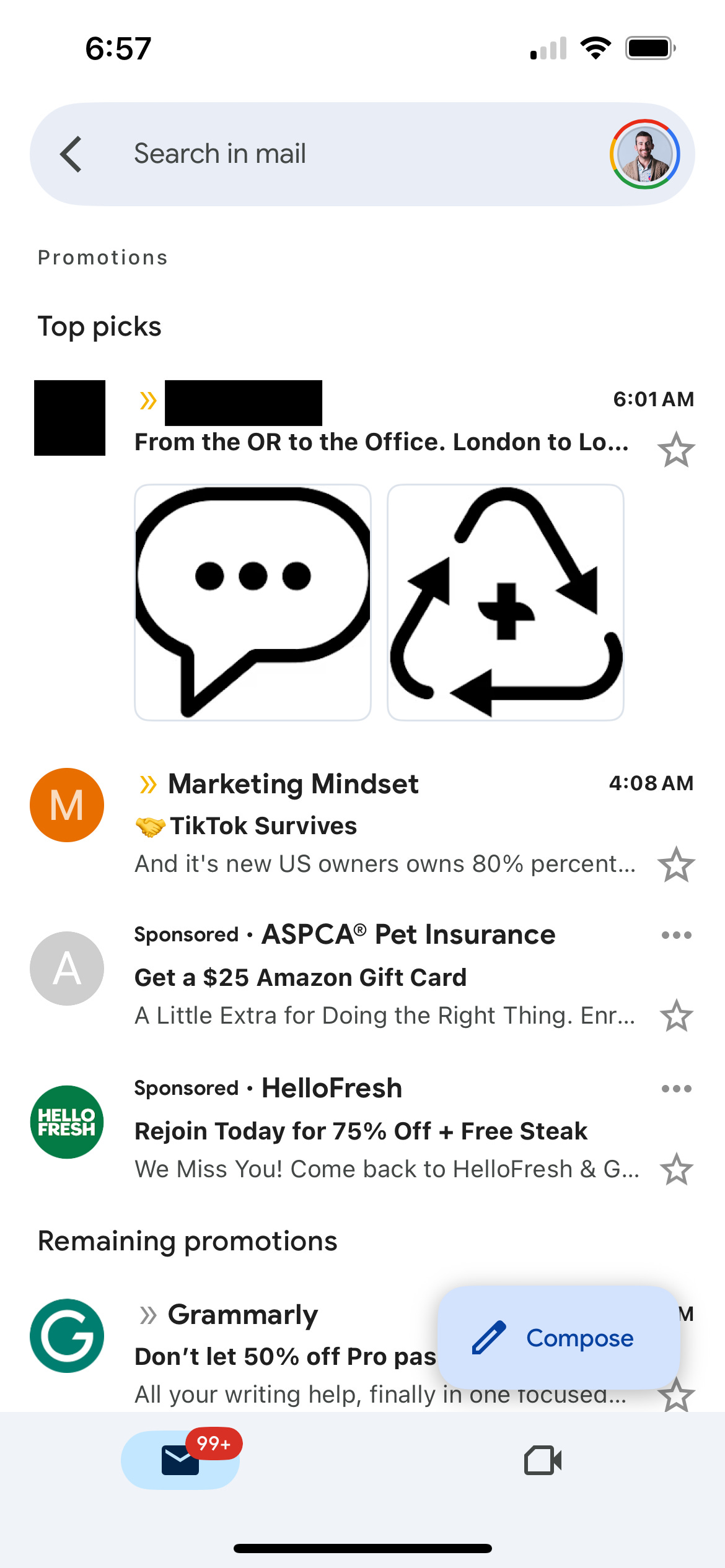
The above screenshot is from an image-based email with slices. Gmail passed over the slices, which contained multiple products, CTA buttons, and promotional text and instead surfaced icons in the footer.
Does this impact my brand?
Automatic Extraction can potentially affect any brand. However, those still using image-based email builds — such as legacy templates or sliced creative — are most likely to see negative impacts, since Gmail’s AI may misinterpret which image best represents the product.
How to adapt
To ensure your brand has more control over what Gmail displays, Modular recommends:
Transition to HTML builds (or at least hybrid, drag-and-drop approaches).
Add AMP annotations if you want to guarantee that specific products or promotions are highlighted (requires HTML development resources).
At Modular, we have deep expertise in both HTML design systems and AMP implementation. If you’d like to safeguard your campaigns from Gmail’s Automatic Extraction — and take advantage of annotations to boost visibility — we’re ready to help. Visit modularmarketing.com to connect with us.