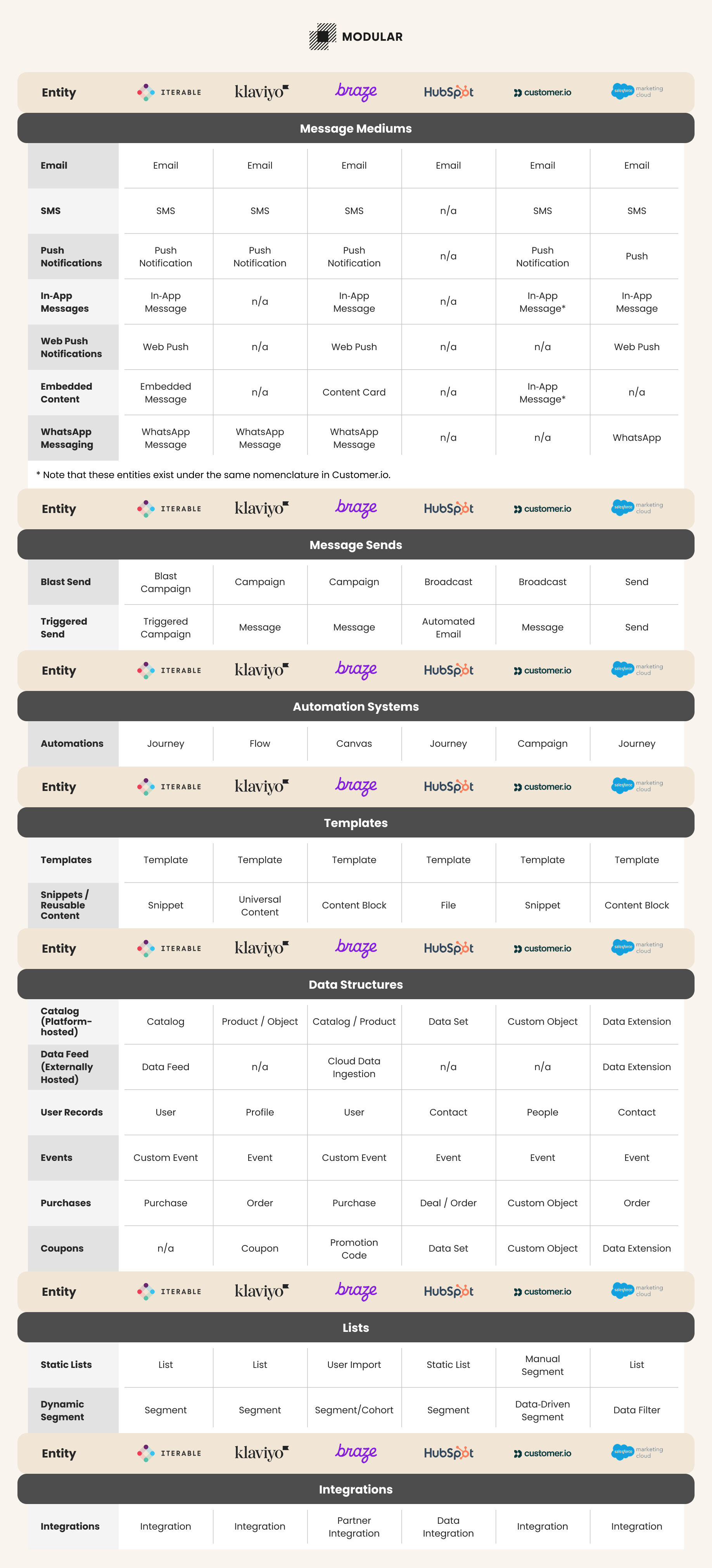

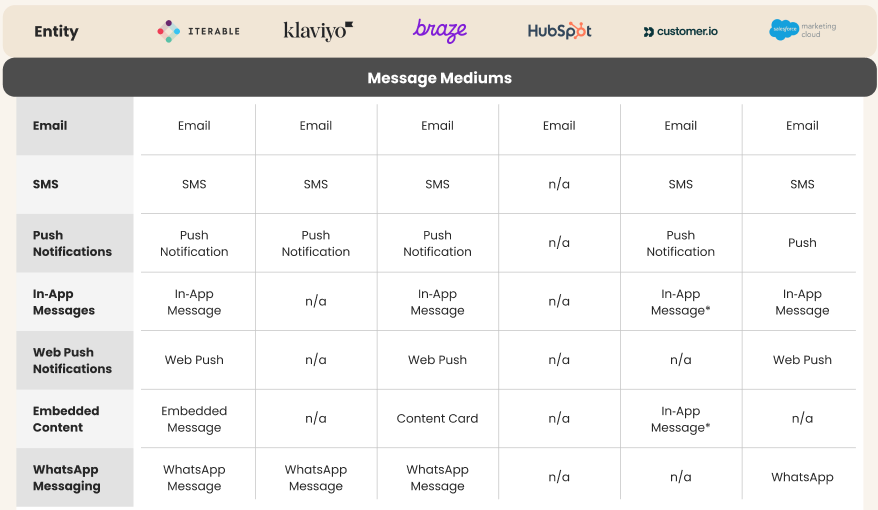
Switching between marketing platforms is hard enough — but half the battle is just figuring out what everything is called. One tool’s “Campaign” is another’s “Broadcast,” and the thing Klaviyo calls a “Flow” might be a “Journey” or a “Canvas” somewhere else.
Same thing, different name.
After managing more platform migrations than I can count during my startup years — and even more after moving into the lifecycle marketing agency world — I’ve learned that terminology is one of the many onboarding hurdles teams face. Whether you’re migrating, collaborating across teams, or just learning a new tool, inconsistent nomenclature slows everyone down.
That’s why we put together this simple translation guide to help you decode the core concepts across Iterable, Klaviyo, Braze, HubSpot, Customer.io, and SFMC. Let’s break it down:
Common “Entities”, Explained.
For lack of a better word, let’s refer to each term we’re going to describe as an “entity” within a marketing platform. Before we dive into the matrix, let’s go over the simple definitions of the most important types of entities:
Blast vs. Trigger Messages
Blast: A one‑time message — often scheduled in advance — sent to a group of people. It can be email, SMS, push, or another channel.
Trigger: An automated message, triggered by an API call or an automation entity in the platform.
Automations
These are automated message sequences that react to a trigger (like a signup or purchase). They may include delays, filters, branching logic, and multiple message types.
Templates
Templates hold your design and content. They can be reused for blast messages or automations.
Snippets
Small pieces of reusable content, like footers or product blocks, that you can use inside templates.
Custom Objects
These hold structured data — like product details, locations, members, promo codes, and more. Some platforms store this inside the tool, while others let you connect an external data feed.
Lists
Lists: Usually static — they stay the same unless you manually change them.
Segments: Usually dynamic — people enter or leave automatically based on rules.
Message Channels
Platforms support different message types. Common channels include:
Email: “Electronic mail”. Look, if you don’t know this one by now — you might just be a time traveller from the distant past.
SMS/MMS: “Short Messaging Service” or “Multimedia Messaging Service”, a.k.a. Text Messages.
Push Notifications: These are the little badges and notifications from mobile apps that appear on your phone screen.
In‑app Messages: In most cases, this refers to overlays and modals in a mobile application. This typically does not include overlays and modals on a website.
Web Push Notifications: These are little badges that appear in your desktop/laptop web browsers. You’ll often find these opt-in messages on news websites. They typically only work with Chrome and Firefox web browsers.
Embedded Content: Native-looking content that appears in a web application or a mobile application that is controlled by a marketing platform (rather than directly in the application code).
WhatsApp: An messaging service that uses WiFi and Internet to send communications, rather than a traditional phone network.
Entity Name Matrix